Write emails people can answer after one line
One prompt and five minutes. Every email you send starts with the ask, then the reasons, then the detail.
Luís Rodrigues5 min read
Here's a typical work email. Hi Sara, hope you're well. Last week we met the supplier. They raised their prices. So I looked at two other options. Finance is fine with either. And then, in the very last line: can you approve the switch by Friday?
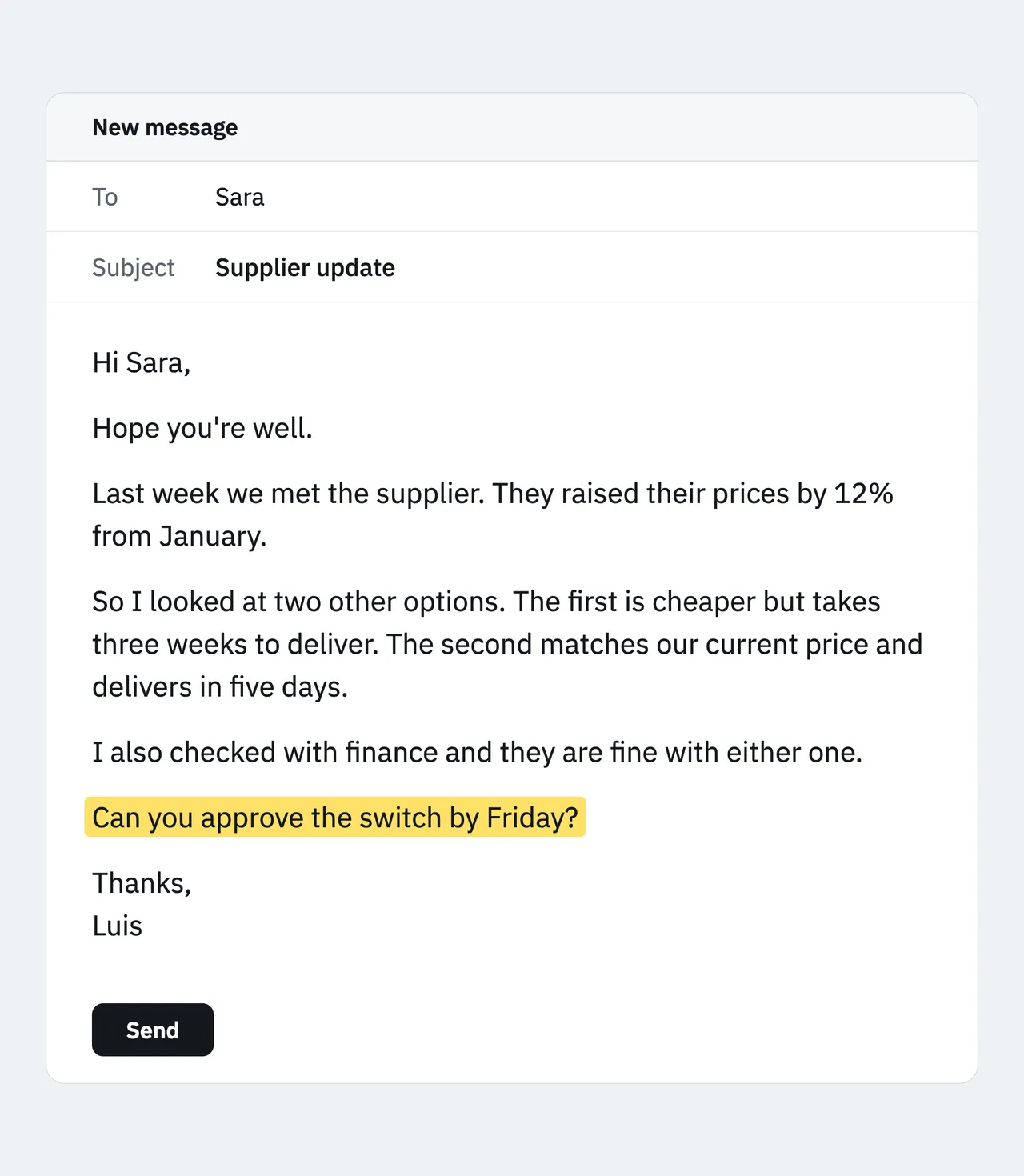
Sara has to read the whole story to find out what you want. We all do it, because we write things down in the order they happened. Asking a chatbot to polish the email doesn't help much: you get better words in the same wrong order.
This guide gives you one prompt that reorders any draft, and a standing instruction so your AI writes this way without being asked. Setup takes about five minutes.
The one rule
Answer first. Then reasons. Then evidence.
It's called top-down communication. McKinsey teaches it as the Pyramid Principle, the US military calls it BLUF (bottom line up front), and journalists call it the inverted pyramid: the conclusion goes first, the main reasons sit under it, and the detail comes last.
Here's the same email, top-down:
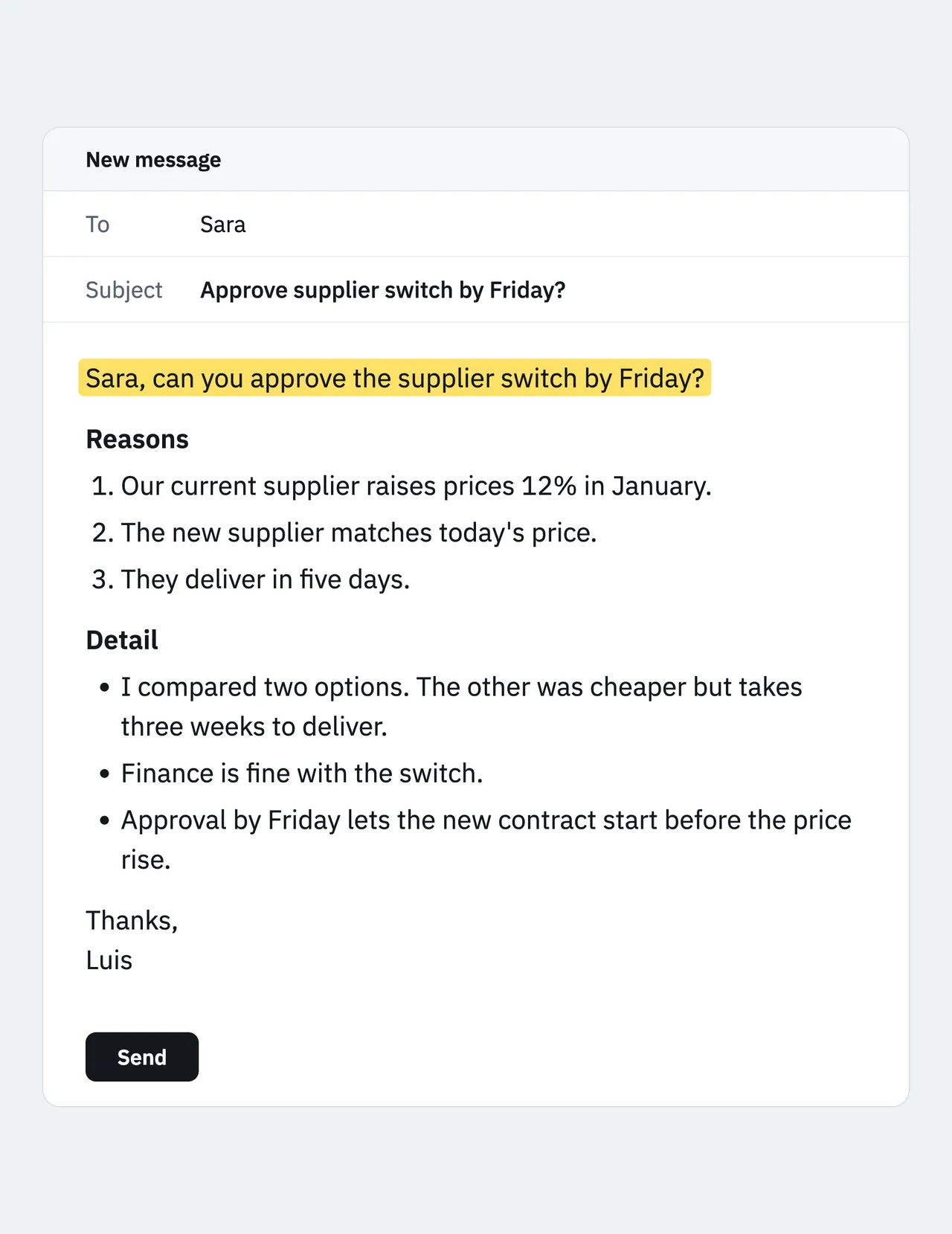
Now Sara can answer after one line. Call that the one-line test: if your reader stopped after the first line, would they know what you need from them?
The top-down email prompt
Paste your draft, or rough notes if you haven't written one yet.
Rewrite the email below so the reader can act after reading the first line.

WHO IT'S FOR: [NAME, THEIR ROLE, AND WHAT THEY CARE ABOUT]
MY DRAFT OR NOTES: [PASTE YOUR DRAFT OR BULLET NOTES]

1. Find the one thing I need from the reader: a decision, an answer, an action, or a fact they must know. If there's more than one, tell me and ask which matters most.
2. Put it in the first line, addressed to them by name, with the deadline if there is one.
3. Write a subject line that states the ask, not the topic.
4. Add up to three reasons, one short line each, most important first.
5. Put any remaining detail last, and cut anything the reader doesn't need to decide.
6. Keep it under 150 words. No "hope you're well" opener.
7. Use only facts from my draft. Don't invent numbers, dates or reasons.

If you can't find a clear ask, ask me what I want from the reader instead of guessing. Show me the draft and tell me in one line what you cut.
How to read the result
Run the one-line test first: cover everything below the first line. If a colleague read only that, could they reply "yes", "no" or "here's the number"? If not, the ask is still vague. Say so: "The first line still doesn't say what I need. Try again."
Then check the reasons. Are they the ones the reader cares about, or the ones you happened to mention first? Last, read the "what I cut" line, because sometimes the AI cuts the one detail that answers the obvious question.
Make it stick
Instead of pasting the prompt every time, give your AI the rule once.
- ChatGPT: Settings, then Personalization, then Custom instructions (OpenAI's help page, checked October 2026).
- Claude: Settings, then the box that asks what personal preferences Claude should consider in responses (Anthropic's help page, checked October 2026). For one area of work, put it in a project's instructions instead.
RULES FOR EMAILS, MESSAGES AND UPDATES I ASK YOU TO WRITE OR EDIT
1. Put the conclusion or the ask in the first line. Then up to three reasons. Then evidence or detail.
2. Subject lines state the ask or the conclusion, not the topic.
3. If I haven't said what I want from the reader, ask me before writing.
4. Never add facts, numbers or reasons I didn't give you.
5. These rules don't apply to anything else, like stories or brainstorming.
Heads up: Custom instructions apply to every chat. Rule 5 keeps a birthday message from turning into a bulleted memo. Test it in a new chat: paste a rambling draft and say only "tidy this up".
Common mistakes
- Polishing instead of reordering. "Make this more professional" keeps the order. Ask for the structure by name: ask first, reasons, detail.
- Two asks in one email. The reader answers the easy one and forgets the other. Send two emails, or number the asks in the first line.
- Sending without reading. The AI may tidy a "maybe" into a "definitely" or round a number. Check every fact against your draft.
The honest part
The AI doesn't know what you want from the reader. If your draft is vague, it will guess, and a wrong ask sitting clearly in the first line is the one the reader will act on. That's why the prompt tells it to ask you.
It also changes tone. Leading with the ask can read as abrupt to someone senior, to a client you don't know well, or in workplaces and cultures where a greeting comes before business. Keep the ask first and add one warm line after it if you need to.
Before you paste, black out what doesn't belong in a chatbot: client names under NDA, contract terms, salaries, and colleagues' health or personal details. On a work account, check your company's AI policy first.
And some emails shouldn't be top-down. Condolences, bad personal news, or a message to someone who's struggling need context and care before any ask. Anything with legal or HR consequences, like a resignation, a complaint or a disciplinary note, should be read by a person who knows the situation before it goes out.
Your action plan
- Open the last email you sent that needed something from someone, and run the one-line test on it.
- If it fails, run the top-down email prompt on it and compare the two first lines.
- If the rewrite passes, add the top-down rule to ChatGPT's custom instructions or Claude's preferences.
- Use the prompt on your next email that needs a decision.
Open your sent folder now.
- #writing
- #work