Pick the right Claude model: Haiku, Sonnet, Opus or Fable
Four models, one usage limit. One test and 15 minutes to match each task to the right model and make your limit last longer.
Luís Rodrigues5 min read
Next to Claude's send button there's a small menu with four names in it: Haiku, Sonnet, Opus and Fable. It's easy to pick one on day one and never open the menu again, until you hit your usage limit halfway through the afternoon and can't work out why.
The model you pick decides how good the answer is, how long you wait, and how fast your limit runs out. Anthropic's own guide puts it plainly: using Opus on a task Haiku could handle "costs you tokens for no gain and slows you down in the process."
In about 15 minutes you test two models on one of your own tasks and find the setting that makes your limit last longer.
The plan · 15 minutes, 1 prompt
- Meet the four models
- Run the ten-minute test
- Turn the Effort down
1. Meet the four models
Think of the models as four vehicles and your usage limit as one tank of fuel. A bigger vehicle carries more, moves slower and empties the tank faster, and you wouldn't rent a moving truck to buy milk.
| Model | Think of it as | Pick it when you | Plans |
|---|---|---|---|
| Haiku 4.5 | Scooter | Want a quick answer and a rough one is fine | All, free included |
| Sonnet 5.5 | Car | Are writing or doing ordinary work with a few steps | All, free included |
| Opus 5.5 | Van | Will push back and redirect it several times | Pro and above |
| Fable 5.1 | Moving truck | Want to hand over a whole job and check the result | Max, or credits on Pro |
Anthropic's advice for app users works like a ladder: if you're not sure, start with Sonnet. Move up to Opus when Sonnet struggles, and to Fable when Opus does.
Check a few of your weekly tasks against the third column. If one fits two rows, that's the one to test next.
2. Run the ten-minute test
The table gets you close, but you'll only know whether the bigger model is worth it for a task by trying both. Take a task that fit two rows.
- Open a new chat, click the model name next to the send button, and pick the smaller model.
- Paste the task with everything Claude needs to do it, and end with: "Give me your best answer in one go. Don't ask me questions first. If something is missing, say what you assumed."
- Open another new chat, pick the bigger model, and paste exactly the same text.
- Paste both answers into the judge prompt below.
Open a third chat for the judge. Use Opus, or Sonnet if you're on the free plan.
Below are two answers to the same task. I'm not telling you which model wrote which.

Compare them on three things:
1. Is anything wrong or made up?
2. Does one answer cover something important that the other missed?
3. Which one could I use as it is, with the least editing?

Then tell me plainly whether the difference is big enough to matter for this task, or whether either would do. Quote the lines that back up your verdict.

THE TASK:
[PASTE THE TASK]

ANSWER A:
[PASTE THE FIRST ANSWER]

ANSWER B:
[PASTE THE SECOND ANSWER]
If the judge says either would do, use the smaller model for that task from now on. If the bigger one caught a real mistake, keep it. Note the result next to the task so you don't have to test it again.
3. Turn the Effort down
Effort is a second setting in the same menu. If the model is the vehicle, Effort is how hard you press the pedal. Higher effort gives a more thorough answer, takes longer and uses more of your limit.
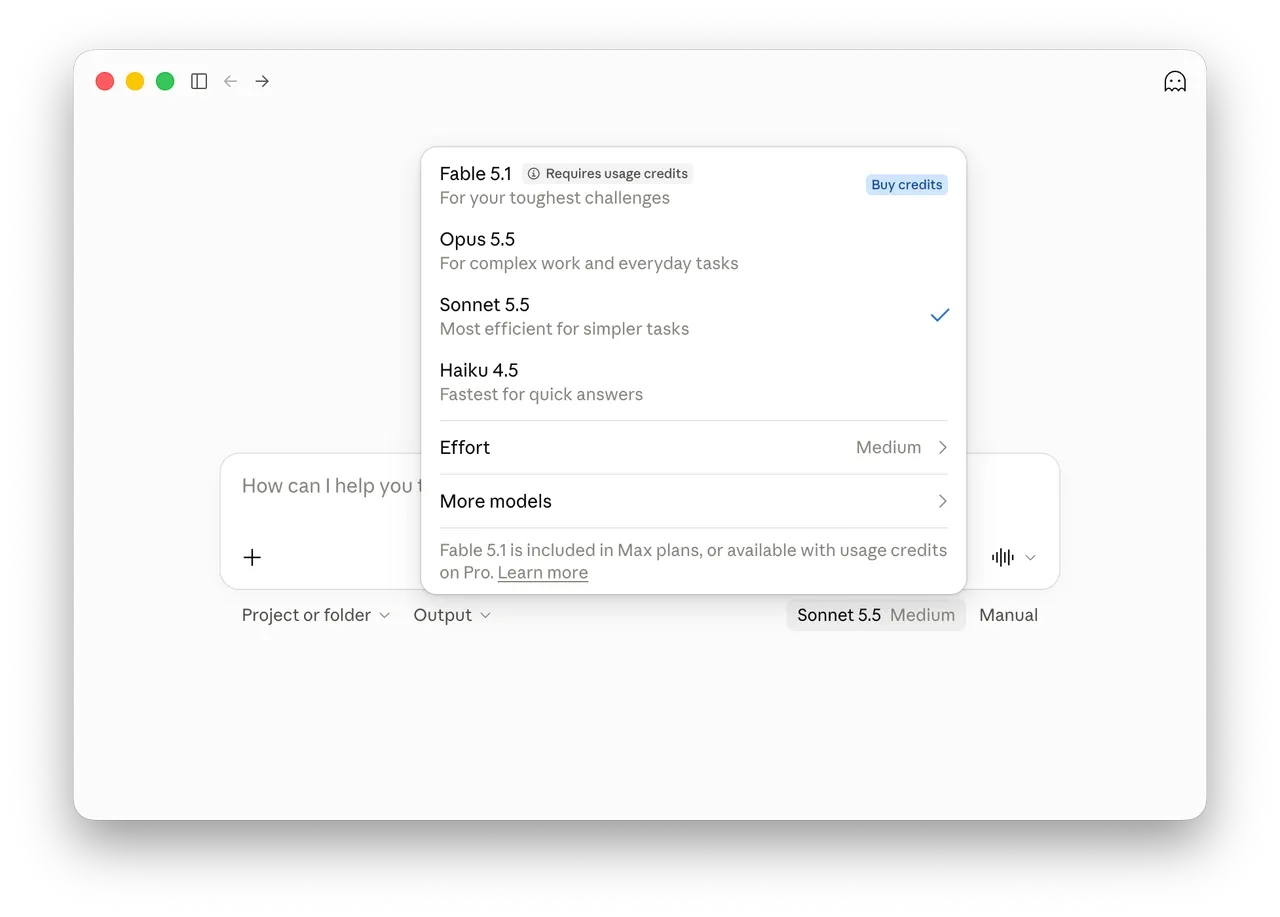
- Click the model name next to the send button.
- Click Effort.
- Choose a level. The recommended one is marked "Default".
| Level | When to use it |
|---|---|
| Low, Medium | Routine tasks. These make your limit last longer. |
| High | The best overall balance of quality and speed. |
| Extra high | Long coding jobs and tasks Claude works through by itself. Not on every model. |
| Max | The hardest problems, where getting it right matters most. The slowest option. |
Effort works on Sonnet, Opus and Fable, not Haiku. You can change it mid-chat, and it applies from Claude's next answer (Claude's help centre).
Then rerun the step 2 test on one model, with Effort one level lower. If the judge says either answer would do, keep the lower level for that task.
Tip: On a paid plan, Settings, then Usage, shows how much of your five-hour session and weekly limits you've used. Check it before and after a big task to see what that task cost.
Common mistakes
- Testing with a vague task. If the prompt leaves things out, both models guess and you end up judging the guesses. Give it everything it needs to do the job.
- Judging by length. The longer answer often isn't the better one. Anthropic's guide says to "compare where the answers differ, not how long they are."
- Staying in one chat all day. Start a new chat when the topic changes, and use the handoff prompt when you need to bring the context along.
The honest part
- There's no hard rule. Anthropic's guide for app users says start with Sonnet, its developer docs say start with Opus, and the app's menu calls Opus "for complex work and everyday tasks". They disagree, so trust your own test.
- Fable has limits of its own. On Pro it needs usage credits, bought on top of your plan. On Pro and Max it can use at most half of your weekly limit. For some topics, including biology, chemistry and offensive security, Claude switches the answer to an Opus model and tells you it did.
- The judge can be wrong. Read the two answers yourself, and check facts and numbers whichever model wrote them.
- One run can be lucky. Test two or three tasks before you settle on a model for a whole type of work.
- Names and numbers change. Everything here was checked on 3 October 2026. Model versions, plans and limits change often, so look at the pricing page before you rely on a detail.
Your action plan
- Open the model menu and check which model and Effort level you're on.
- Pick a task that fits two rows of the table and run the ten-minute test.
- Drop Effort one level on that task and run the judge again.
- Note which model and Effort level won.
Step 1 takes ten seconds. Do it before your next chat.
Try next: Move a long chat to a fresh one without losing your place
- #claude
- #models
- #getting-started