Learn how to grow on LinkedIn from the creators growing fastest
Ask Claude who grew most on LinkedIn this month and which posts did it, then use the pattern in your own posts. About ten minutes to set up.
Luís Rodrigues5 min read
I pick my LinkedIn topics by looking at who's growing fastest and which posts did it.
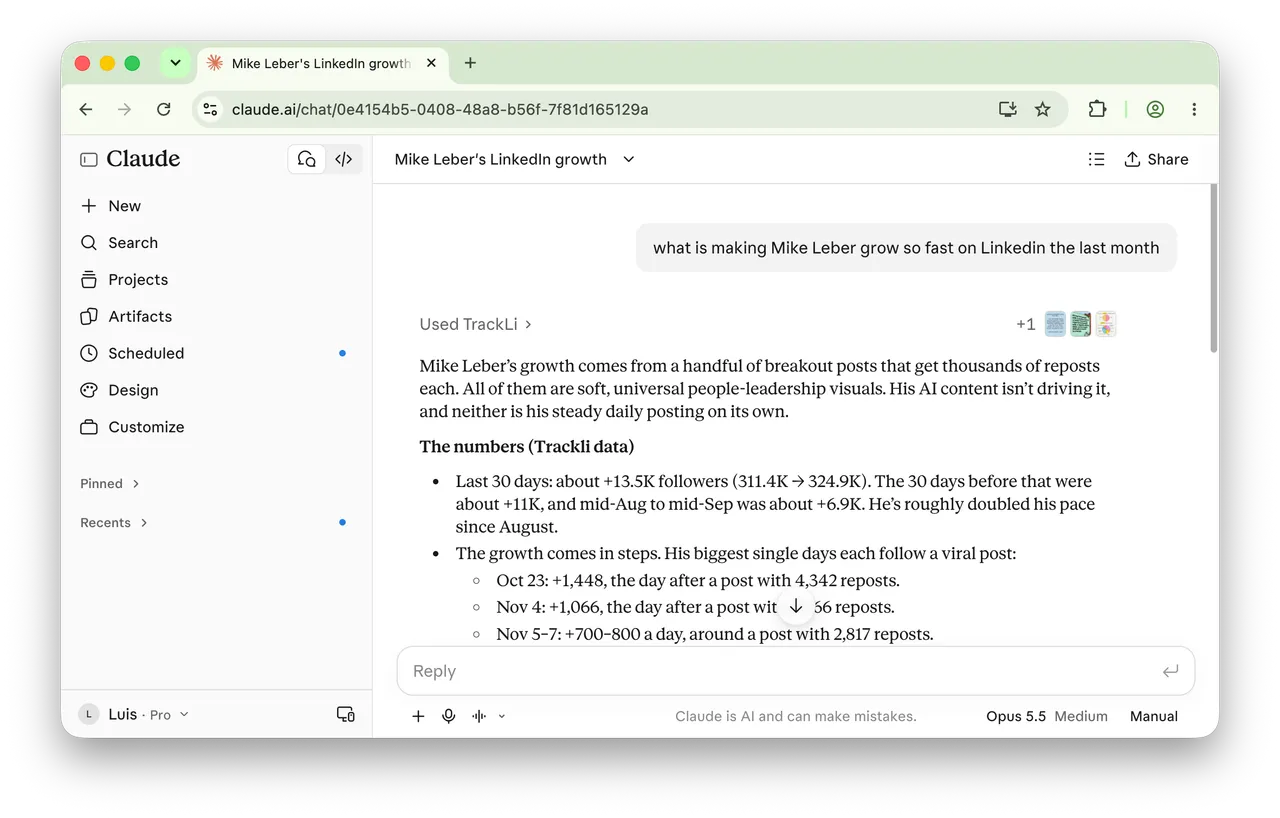
Take Mike Leber. He gained about 13,500 followers in 30 days, roughly double his pace in August. His biggest days each came right after a post that got thousands of reposts. Every one of those posts was an image: soft people-leadership visuals, like a hand-drawn watercolour Venn diagram and a plain blue card in handwritten font. His AI posts weren't what drove it.
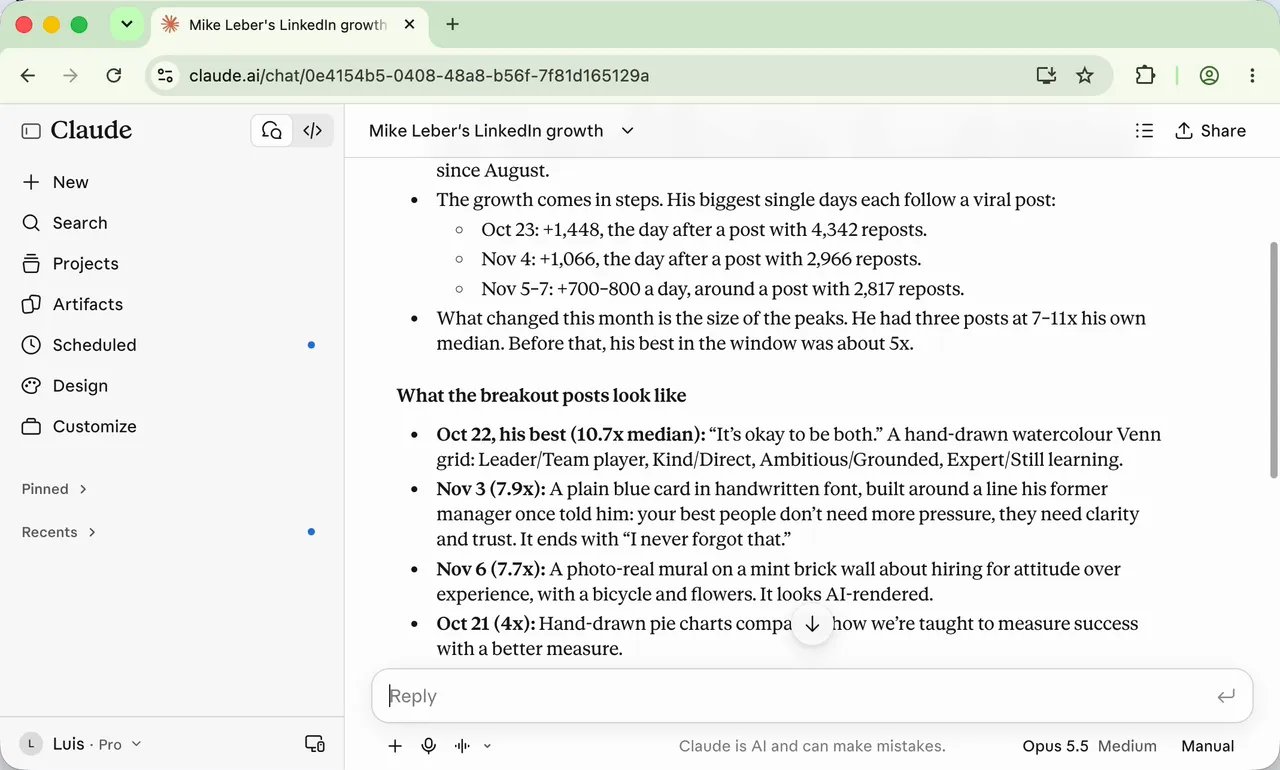
You can't see that by scrolling. On a big account every post has big numbers, so it's easy to copy the wrong one. What you want are the posts that beat that creator's normal, and Claude can find them if it can see follower history and post numbers. So I built Trackli to give it those numbers. In about ten minutes you can connect it to Claude, add the creators you admire and start asking.
Before you start
- A Trackli account with onboarding finished. Sign up at trackli.ai and go through the setup to the end. Until you do, Claude can't add creators to your list.
- A Claude account at claude.ai.
- Links to 3 to 5 creators you admire, copied from their LinkedIn profiles.
The plan · 10 minutes, 4 prompts
- Connect Trackli to Claude
- Add the creators you want to learn from
- Ask who grew and why
- Find the posts that beat their normal
1. Connect Trackli to Claude
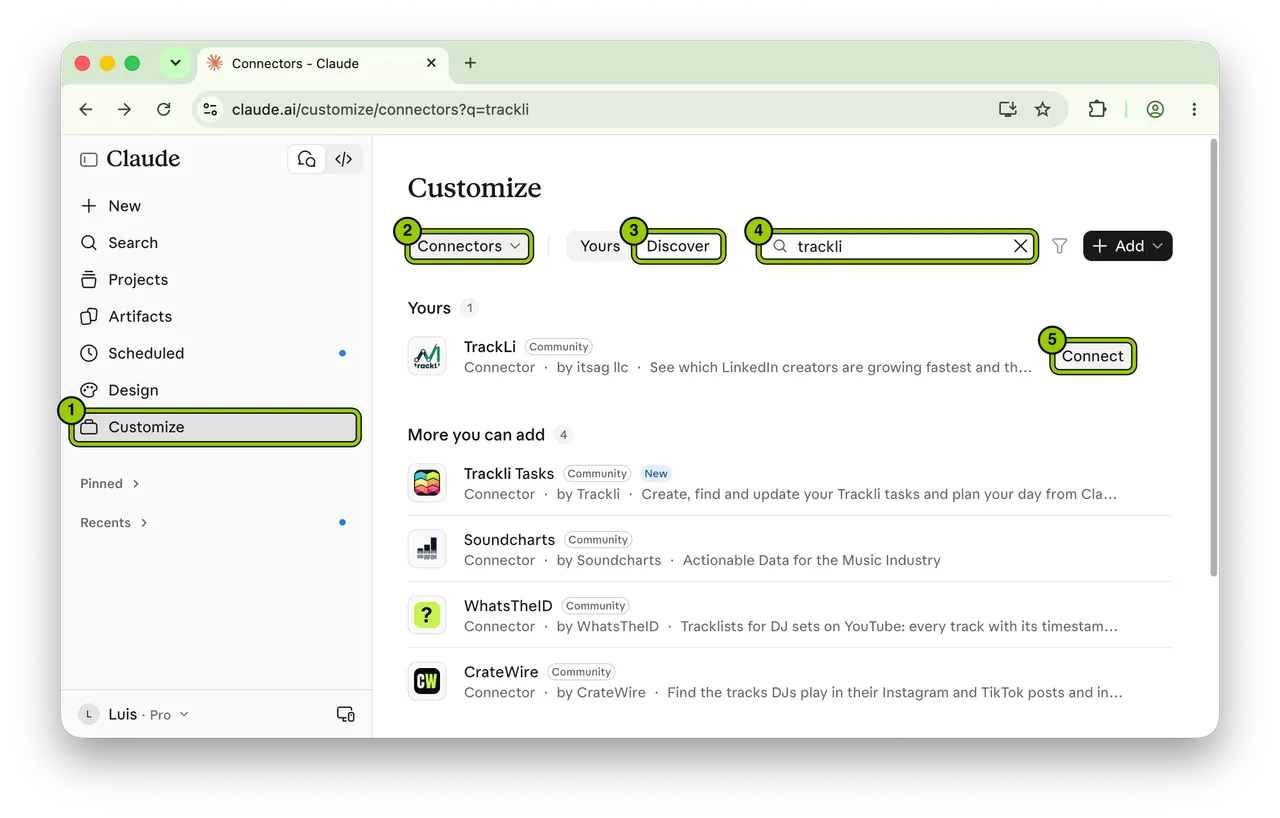
Go to claude.ai, then:
- Click Customize in the sidebar.
- Choose Connectors.
- Click Discover.
- Type "trackli" in the search box.
- Click Connect next to TrackLi.
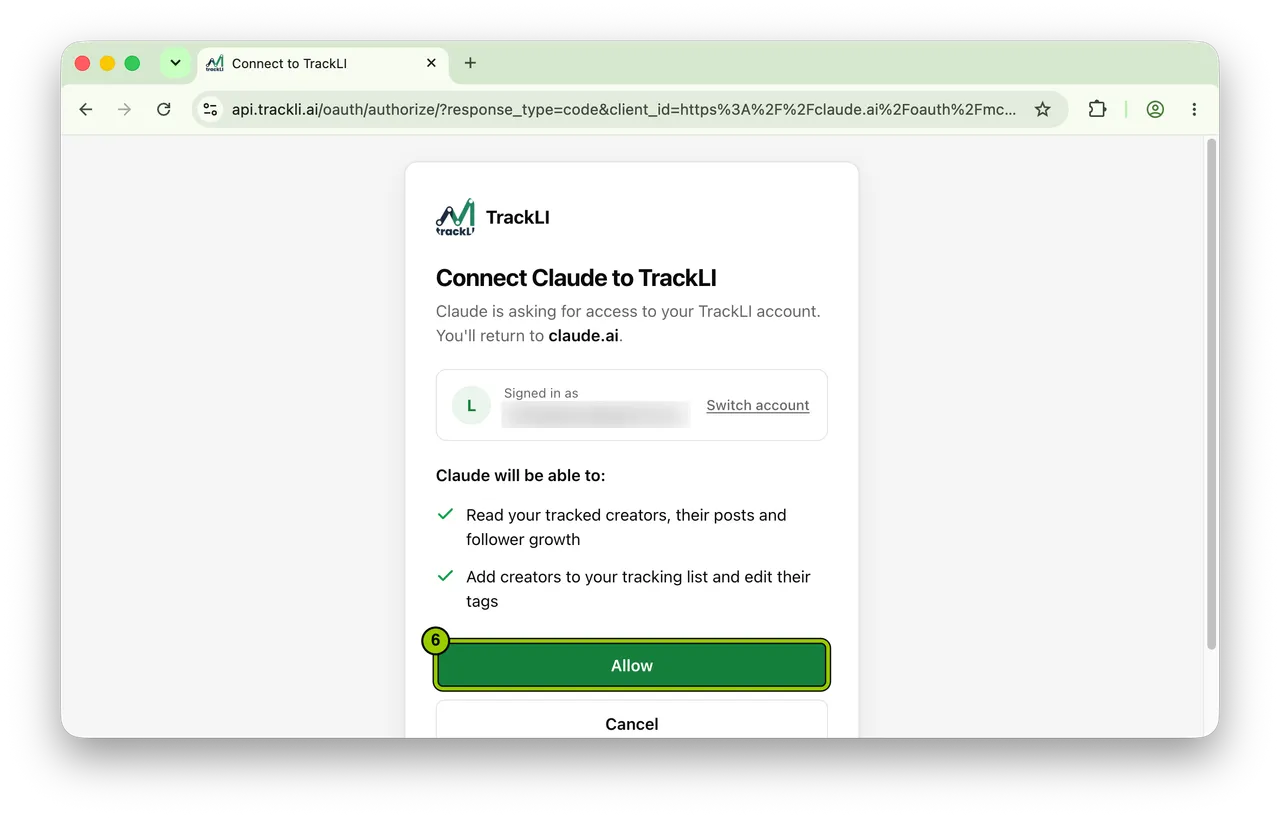
- Trackli opens and shows what Claude will be able to do: read the creators you track, with their posts and follower growth, and add creators and edit their tags. Click Allow and you're back in Claude.
2. Add the creators you want to learn from
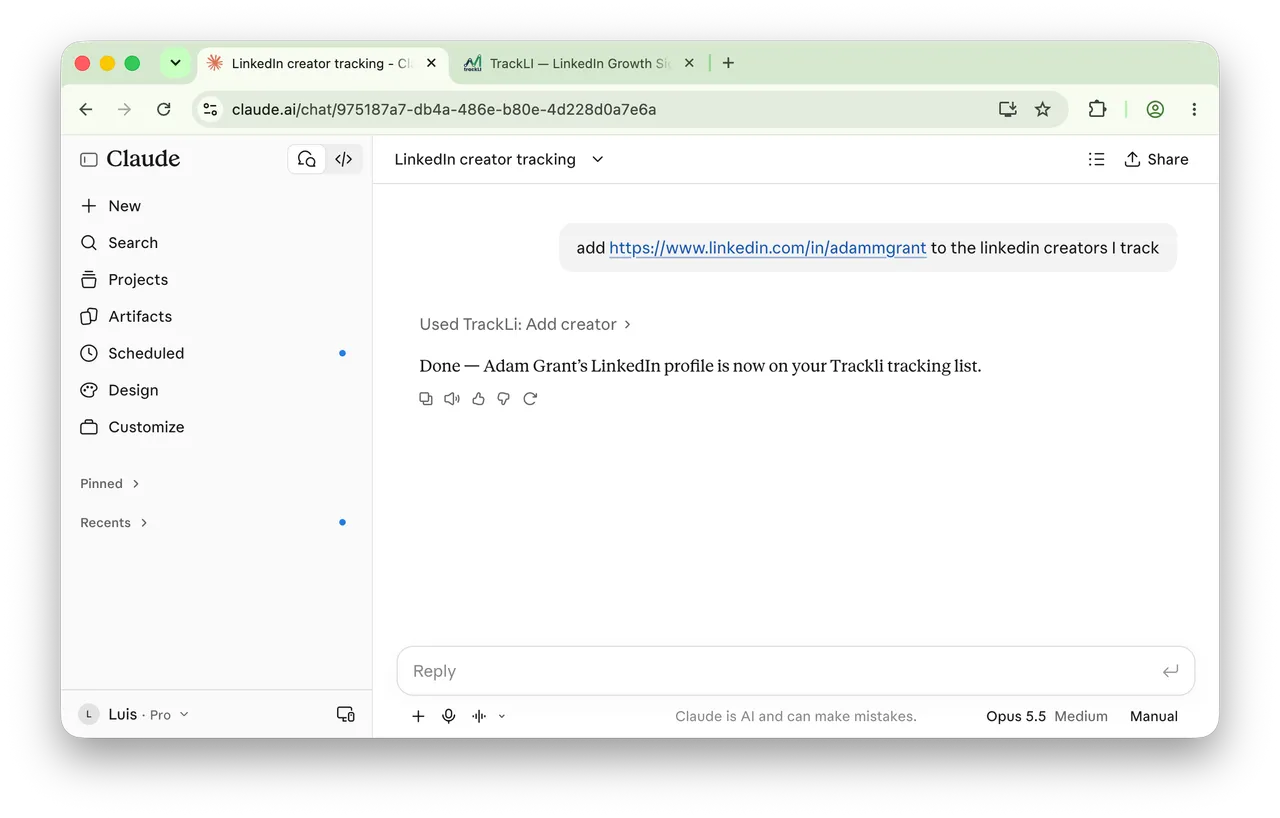
Claude only sees creators on your Trackli list. Add them from the chat, one link per message:
add [LINKEDIN PROFILE LINK] to the linkedin creators I trackClaude tells you when it's done. Add your own profile the same way and say it's yours, so Claude can compare you with the people you're learning from.
3. Ask who grew and why
Start wide:
Who grew the most on LinkedIn this month and what did their best posts have in common?Or ask about one person:
what is making [CREATOR NAME] grow so fast on Linkedin the last monthFor Mike Leber, Claude came back with his follower growth for each of the last three months, the days he gained the most, and the post that came just before each of those days.
4. Find the posts that beat their normal
A post with 4,000 reposts from someone with 300,000 followers isn't the same as 400 reposts from someone with 5,000. Trackli compares each post with that creator's median post (the middle one: half their posts do better, half do worse). Mike Leber's best post in the last 30 days got 10.7 times his median. Before that, his best was about 5 times.
Look at the posts from [CREATOR NAME, OR "EVERYONE I TRACK"] in the last 30 days.

1. List the 5 posts that beat that creator's usual numbers by the most, with how many times their median each one got.
2. For each, describe the format (text, image, carousel or video), the topic and the first line.
3. Tell me what at least 3 of the 5 have in common. If there's no clear pattern, say so.
4. I write about [YOUR TOPICS IN ONE LINE]. Pick the 2 patterns I could use without copying anyone.

Flag any post that looks like a one-off, like a news story or a repost from someone much bigger.
Run it for any creator you admire, and on everyone you track once a month.
Common mistakes
- Skipping onboarding. If Claude says it can't add a creator, finish the setup at trackli.ai and ask again.
- Asking about someone you don't track. Claude only sees creators on your list, so add them first (step 2).
- Copying the post instead of the pattern. A watercolour Venn diagram worked for Mike Leber's audience. Keep the format and the kind of idea, and put your own topic in it.
The honest part
- "What their best posts have in common" is Claude's reading of the numbers. A post can spread because someone big reposted it, and that doesn't show in the data. Open the top posts yourself before you change what you write.
- Followers also come from outside LinkedIn: a podcast, a newsletter, a mention in the press. Claude only sees the posts.
- Three breakout posts in a month is a small sample. Treat the pattern as something to test on your own posts for a few weeks.
- Trackli uses public LinkedIn data and doesn't log in to your LinkedIn account. I built it, so I'm not a neutral reviewer.
Your action plan
- Sign up at trackli.ai and finish onboarding.
- Connect Trackli in Claude: Customize, then Connectors, then Discover.
- Add three creators you admire, and your own profile.
- Ask who grew the most this month.
- Run the "beat their normal" prompt on whoever grew the most.
Add your first creator tonight.
- #claude
- #connectors